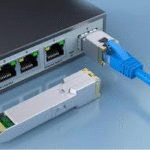





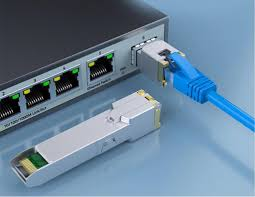
Many enterprises and industrial facilities still own perfectly functional legacy switches that feature SFP optical ports but few or no built‑in RJ‑45 copper interfaces. When a network upgrade or expansion requires connecting a copper‑only device – such as an IP camera, an old printer, or a legacy server – the natural reflex is to replace the entire switch. That is expensive and wasteful. A far more cost‑effective solution exists: 1G SFP modules with a 1000BASE‑T copper interface. By inserting one of these small transceivers into an unused SFP slot, the optical port effectively becomes a standard Gigabit Ethernet copper port over twisted‑pair cabling (Cat5e/Cat6, up to 100 metres). This article explains how to use 1000BASE‑T SFP copper modules (industrial‑grade, RJ‑45) to extend the life of old switches, avoid unnecessary hardware purchases, and simplify brownfield network expansions.
How a 1000BASE‑T SFP Copper Module Works
Unlike an optical SFP module that converts electrical signals to light, a copper SFP module contains a small PHY (physical layer) chip. This chip performs echo cancellation, adaptive equalisation, and line coding (PAM‑5) to transmit Gigabit Ethernet over standard unshielded or shielded twisted‑pair cable. From the switch’s perspective, the module looks like any other 1G SFP – it uses the same SerDes interface and management bus. When you plug the module into an SFP slot and connect a Cat5e/Cat6 cable to its RJ‑45 port, the switch treats that port as a regular 1G electrical interface. Auto‑negotiation handles speed (10/100/1000Mbps) and duplex settings automatically, and features like MDI/MDIX crossover detection work without any manual configuration. This plug‑and‑play behaviour makes the copper SFP an ideal tool for repurposing spare optical ports.
Critical Compatibility Considerations Before Buying
Power Budget and Legacy Switch Support
The most common reason a 1000BASE‑T SFP module fails to work in an older switch is insufficient power delivery. Early SFP specifications assumed optical modules would draw less than 0.8W. However, a copper SFP module – especially one that supports 100m reach and industrial temperature ranges – typically consumes between 1.0W and 1.5W. Some legacy switches (manufactured before 2010) cannot supply that much current on their SFP power rails. As a result, the module either does not initialise at all, or it links intermittently. Before buying, check your switch model’s documentation for “SFP power budget” or “copper SFP support”. Many vendors publish a list of officially supported copper SFPs. If your switch is not listed, try a “low‑power” 1000BASE‑T SFP module (some consume only 0.9W), or update the switch firmware – later firmware versions often improve power management.
Switch Firmware and Transceiver Coding
Another compatibility trap is vendor‑specific coding. Some switch brands (Cisco, HP, Juniper) check the SFP’s EEPROM data against an internal whitelist. If the module does not report an approved vendor ID, the switch may reject it even if the module is electrically compliant. Reputable third‑party suppliers offer “coded” copper SFPs that mimic the brand’s own part numbers. For industrial environments where downtime is expensive, always request a sample module for testing before bulk ordering. Also, ensure the switch is running the latest firmware – newer releases often add support for third‑party copper SFPs that were previously blocked.
Practical Use Cases for 1G Copper SFP Modules
Use Case 1: Adding More Copper Ports Without Buying a New Switch
Imagine a small office that has a 24‑port SFP‑based aggregation switch (used for fibre runs to distant buildings) but needs to connect six desktop PCs that only have Ethernet ports. Replacing the entire switch with a copper‑port model would cost thousands. Instead, install six 1000BASE‑T SFP copper modules into the idle SFP slots. Each module gives you a Gigabit RJ‑45 port. With a short patch panel, you can connect the PCs directly. The total investment is a few hundred dollars, and the original switch remains in service.
Use Case 2: Expanding an IP Camera System Without Replacing the Switch
A factory uses an industrial switch with four SFP slots and eight copper ports. All copper ports are already occupied by PLCs and HMIs. Management wants to add four more PoE cameras (note: copper SFP modules do NOT provide PoE – a separate PoE injector is needed). By inserting 1G copper SFPs into the two spare SFP slots, the factory gains two additional copper links. These connect to PoE injectors, then to the cameras. The alternative – buying a new 24‑port switch – would require re‑cabling and re‑configuring VLANs, causing hours of downtime. The copper SFP approach adds ports in minutes.
Use Case 3: Repurposing Legacy Servers with Optical‑Only Top‑of‑Rack Switches
Some older data centres still have top‑of‑rack switches that offer only SFP ports (no RJ‑45). Legacy management servers or backup appliances often lack SFP cages. Instead of installing a separate copper switch, network engineers can plug a 1000BASE‑T SFP into the ToR switch and connect the server via a short Cat6 patch cord. This keeps the management network flat and avoids additional switch hops. It is also useful for temporary lab setups where a copper device needs to be connected to an optical‑only test switch.
Step‑by‑Step Deployment and Troubleshooting
Installation Checklist
Verify switch support – Check the vendor’s compatibility matrix or test a sample module.
Insert the module – Align it correctly with the SFP cage; push until it clicks. Do not force it.
Connect the cable – Use Cat5e or Cat6 (Cat6 is recommended for full 100m reach in noisy industrial environments).
Check link status – The switch should report “up” within a few seconds. Use show interface transceiver or similar commands to read module temperature and voltage.
Test cable integrity – Many switches support TDR (time domain reflectometry) on copper SFPs to detect cable breaks or poor terminations.
Common Problems and Fixes
Module not recognised – Update switch firmware, or try a different brand with proper coding.
Link up but no traffic – Check VLAN configuration. Some switches assign optical ports to different VLANs by default.
Intermittent disconnects – Usually a power issue. Try a low‑power copper SFP module or move the module to a different slot (some slots share power budgets).
Short reach (only 50m instead of 100m) – Replace the cable with solid‑conductor Cat6; avoid CCA (copper‑clad aluminium) cables.
Conclusion
The 1000BASE‑T SFP copper module is an underappreciated tool for network optimisation and equipment reuse. It turns idle optical ports into functional Gigabit Ethernet copper ports, saving organisations from expensive switch replacements. For enterprise IT teams, system integrators, and weak‑current project managers, mastering this simple device means lower capital expenditure, less electronic waste, and greater flexibility during network expansions. Just remember to check compatibility – especially power delivery and firmware support – and choose industrial‑grade modules when operating in harsh environments. With the right approach, those dusty SFP slots can become your most valuable copper ports.